

lithoAPC Run to Run
Features
lithoAPC combines a modern interface with a clear, workflow-oriented user experience. Engineers can move through complex APC functions quickly because the architecture is structured, modular, and consistent.
- General
Intuitive user interface
- visualize measurement and process data
- create, delete, and configure master data
- control the status of master data
- visualize and compare all analysis results and intermediate information including
- systematic failure
- value and residual statistics
- residuals
- trigger manual analysis for single or selected runs
- edit run context information or measurement values
- access wafer visualizations
- visualize the process timeline in diagrams
- access user management and system capabilities
- connect to any lithoAPC server in the network
- export and import functionality
- copy table data
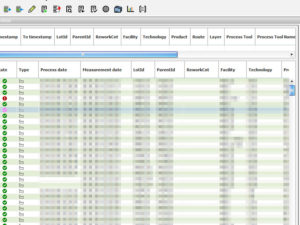
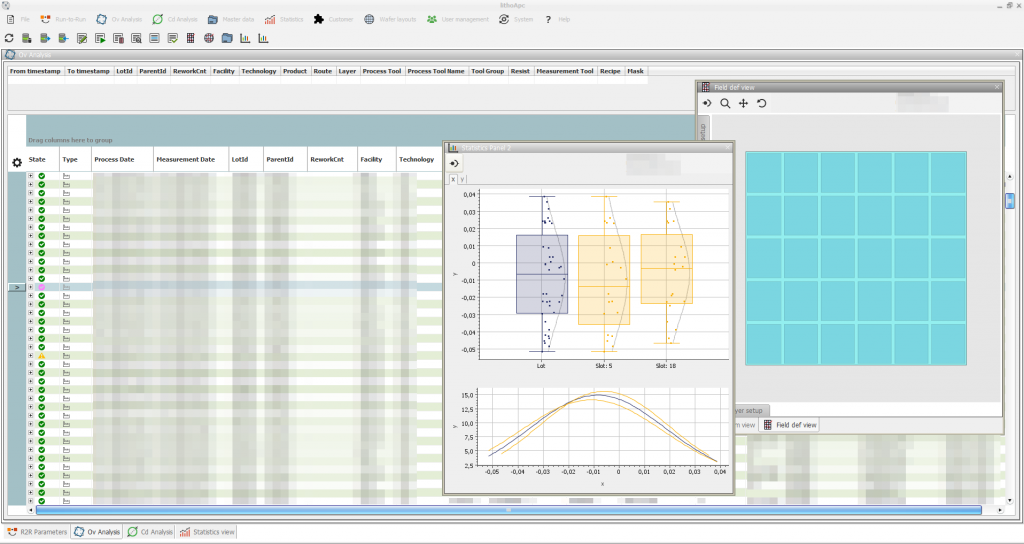
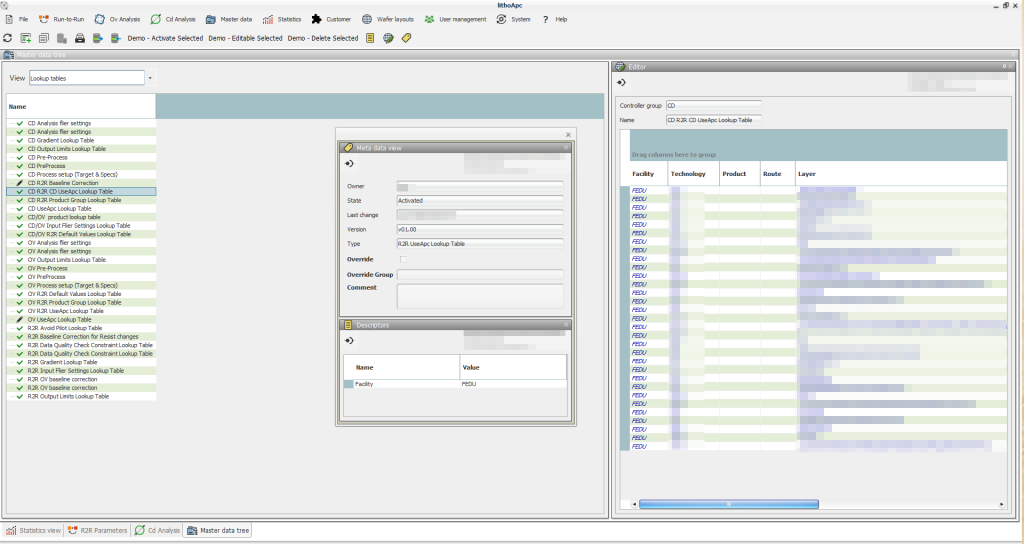
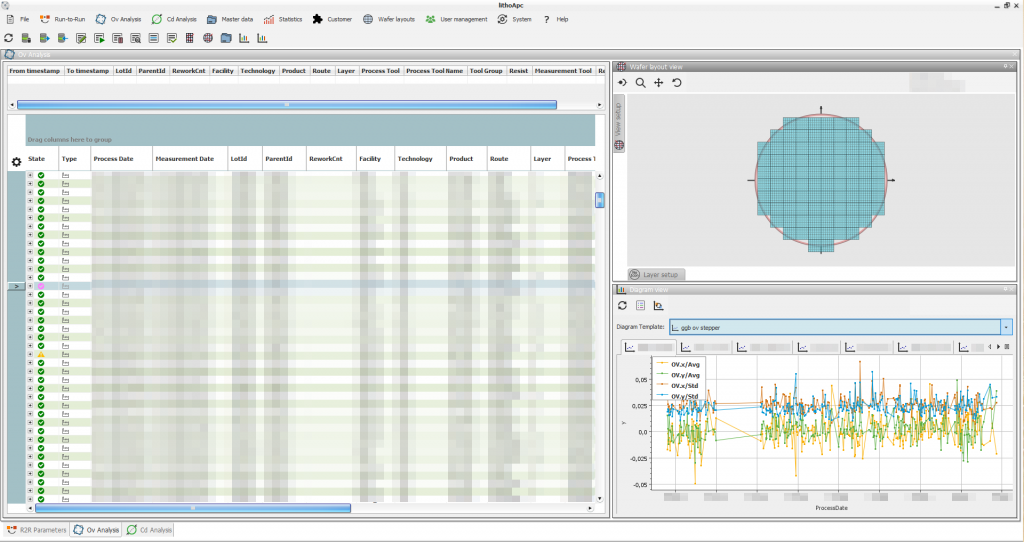
Screenshot RuntoRun View Master data and parameterization
lithoAPC is fully configurable through master data. Master data can define instructions or required analysis information such as wafer layouts, target sets, and parameter models.
New master data implementations and customer-specific master databases can be integrated to extend system functionality.
Master data can be parameterized, and these parameters are evaluated dynamically during analysis. Values are resolved when the run is requested.
LVHM production support
Low-volume, high-mix fabs have specific requirements. lithoAPC is designed for these environments, combining strong production performance with an efficient engineering workflow.
Optimized throughput
lithoAPC focuses on high-quality prediction of offset values and exposure settings for process tools. Modern filtering technology selects the best historical exposures to calculate optimized offset values and exposure energy.
In logic fabs, pilot wafers are often required during product ramp-up and after tool maintenance. lithoAPC addresses these use cases and helps reduce or avoid pilot-wafer runs.
Real-time support
lithoAPC always works with current production data. Some startup-value predictions analyze six months or more of history, so calculation time directly affects tool time. lithoAPC provides results quickly, with 98% of requests completed in under one second and the remaining 2% in under three seconds.
Configurable R2R controller
The integrated R2R controller is highly configurable and supports common photolithography use cases. Even demanding exposure workflows become manageable, from R2R configuration to startup-value generation.
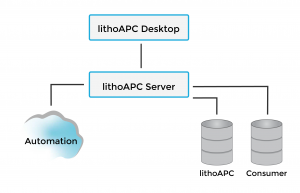
Extensible, modular system architecture
- Standard
Advanced data merge
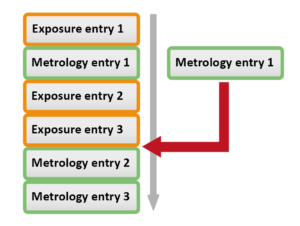
Incoming data is automatically merged with existing process information for the same lot and layer. The merge algorithm recognizes the correct sequence of exposures and measurements. Even complex use cases like tool aborts, reworks and splits are handled by the software.
Default values
Incoming data is automatically merged with existing process information for the same lot and layer. The merge algorithm recognizes the correct sequence of exposures and measurements. Even complex use cases like tool aborts, reworks and splits are supported.
Standard prediction
lithoAPC allows to calculate starting values for the process tool. This calculation is based on reference runs with similar process conditions. The standard configuration selects a defined number of reference runs. Based on these runs, a R2R controller calculates the optimum starting parameters using the configured controller. By default an EWMA controller is used (enhanced weighted moving average). This controller can be replaced with other approaches.
The system allows to run several controllers in parallel. Each controller will manage a predefined subset of all starting parameters. This offers the greatest flexibility for all applications in photo lithography.
User-defined R2R levels with fallback
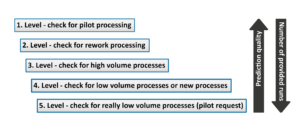
The system can be configured with R2R levels. With this approach, the entire process can be described from a R2R perspective. Especially for high mix production lines and tool mix without dedication, the R2R level support groups e.g. for similar tools or products. This approach has proven itself over many years in advanced logic fabs. The use of R2R levels provides full access to all filter functions like
- flexible selection of filter criteria
- dynamic filter criteria (dynamically
evaluated
based on customer sources) - virtual grouping
- grouping by target or gradient values
Selectable optimization strategy (default: EWMA)
The selected historical runs are optimized with an assigned optimizer. EWMA is used by default, but users can replace it with another optimizer.
Control flow using UseApc flag
The R2R functionality is enabled by default and can be disabled for selected processes. If APC is disabled, the system uses default values.
Virtual grouping
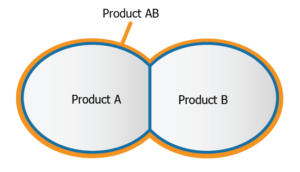
There are logic products, which are identical up to a certain process layer. Technically those products fit into the same controller group – but due to different product names these products often are handled completely independent of each other. To avoid pilot-wafer runs and in order to learn from the other products within the group, lithoAPC enables the declaration of virtual product groups.
Unique 2-phase streaming data filter
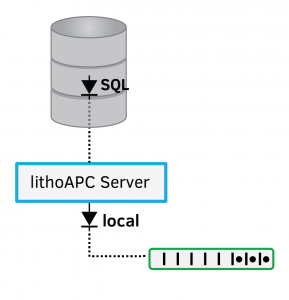
Standard database filtering is applied at the database level. A second system-level filter handles advanced criteria such as dynamic context information. To ensure fast response times, a live database stream is used for filters, outlier checks, and validations. The filter supports complex criteria based on the current run context as well on any context information in the MES system. It includes the status information, scope of time and more. Without any additional effort, the user can filter – for example – by reference layer information or a process tool.
Outlier elimination
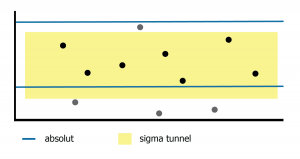
The calculation of the startup values is based on previous runs and their optimal process conditions. The system expects a continuous distribution and tests the data quality. The outlier elimination will detect and remove all runs, which do not follow the common behavior. Outlier elimination is based on a combination of absolute outlier limits and the definition of relative tunnels. 
Constraint check on start-up data
Reference data must meet a predefined minimum quality level. This quality level is defined based on rules. In case of any violation of the user-defined data range the software allows to trigger a pilot wafer to validate the process.
Use constraints
Reference data must meet a predefined minimum quality level. This quality level is defined based on rules. In case of any violation, which can be used to trigger a pilot wafer.
Full inline support for any tool and tool type combinations
The system distinguishes between different tool types. Logical controller groups are supported. Logical controllers can combine data or allows to split data into distinct groups.
Graphical user interface with direct access to data and controller configuration
The extensible user interface provides access to relevant data from any client. The platform approach supports the seamless integration of new modules.
Full traceability of all data including controller setup
The system stores all exposure and measurement activities – no data is lost. lithoAPC will assign the correct measurement to the appropriate exposure entry. Aborted exposures and re-measurements are still stored in the database and provide a complete, unfiltered view of the activities in photo lithography. The existing complete timeline allows to simulate the process with changed process setup for any time frame in the past.
Reset management
Some process issues require selected runs to be disabled. Such runs are never used for any calculation. But these runs are still stored and visible in the user interface.
Charting
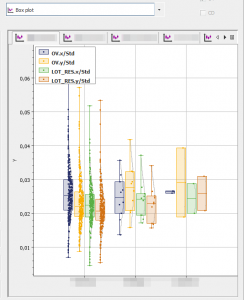
All charting is handled by a dedicated Statistics module. It supports diagram templates for multiple visualization types and can combine analysis data with R2R data. Finally, the templates can be called from the analysis or R2R modules to visualize the currently selected runs.
This template-based approach is efficient and flexible. It supports advanced diagramming features like:
- various diagramming types
- scatter plot
- box plot
- pie charts
- bar plot
- probability plot
- table output
- event timeline
- histogram and normal
- distribution chart
Data can also be grouped into separate charts or series based on the run context.
- Advanced
Gradient monitor
lithoAPC provides capabilities to monitor and upgrade the gradient information. This includes comparing runs from different processes and their behavior and finding similarities and differences. The effort for test runs to update the gradient can be reduced and the production quality can be increased.
Integrated baseline correction
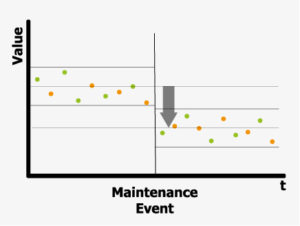
The integrated baseline correction is an advanced feature. Process parameters are not only subject of process behavior. There are also dependencies on the substrate, maintenance activities, resist batches or mask size. Often the impact is just an offset (bias) to the initial baseline. lithoAPC allows to specify such baseline offsets. With this information all available data can be used to predict new starting values even if the data are at different baseline levels. There is no need to delete any data and there is no need to run additional any pilot wafers.

Best-matching view
Different master data are implemented as look-up tables and allow the definition of parameters.
The parameters are each assigned to a set of context values that correspond to the respective processes.
The “Best Matching View” provides a quick overview of the lookup tables and the parameters for a specific run.
Source-code option
Every APC solution is a critical part of semiconductor production. This concerns both the availability of the APC solution and the support for new requirements. We offer a source-code option for the APC solution, which allows you to integrate your own modules, implement new functions and, if required, continue to develop the solution independently.
lithoAPC Critical Dimension
Features
lithoAPC impresses with its modern design and user-friendly interface.
Engineers can navigate features quickly because the architecture is structured and consistent.
- General
Intuitive user interface
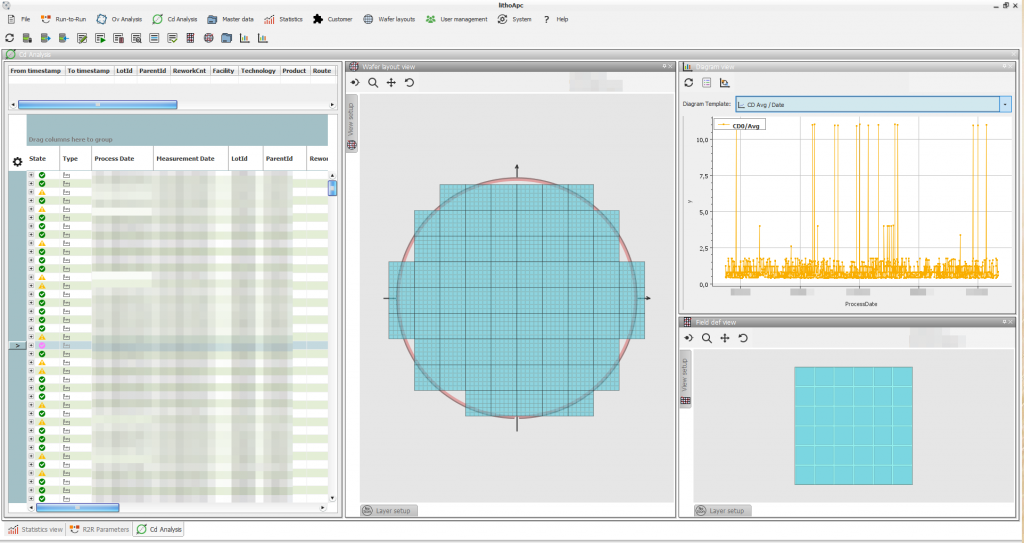
All modules are integrated into the APC desktop application. The interface combines the functions required to configure, monitor, and control APC workflows. In detail, this includes:
- visualize measurement and process data
- create, delete, and configure master data
- control the status of master data
- visualize and compare all analysis results and intermediate information including
- systematic failure
- value and residual statistics
- residuals
- trigger manual analysis for single or selected runs
- edit run context information or measurement values
- access wafer visualizations
- visualize the process timeline in diagrams
- access user management and system capabilities
- connect to any lithoAPC server in the network
- export and import functionality
- copy table data
The ongoing development of the system will produce frequent new modules and new features accessible in the user interface.

Master data and parameterization
lithoAPC is fully configurable through master data. Master data can define instructions or required analysis information such as wafer layouts, target sets, and parameter models.
New master data implementations and customer-specific master databases can be integrated to extend system functionality.
Master data can be parameterized, and these parameters are evaluated dynamically during analysis. Values are resolved when the run is requested.
- Standard
Workflow based
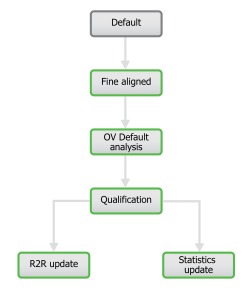
The analysis of lithoAPC is document and work-flow based. The work-flow is defined by the engineers in the master data. It contains the general flow of dedicated analysis steps and their settings. The document approach ensures, that all details of the analysis is collected into a single document, which is stored in the system database. It can be reviewed by the engineer at any time.
Fine alignment
The target locations provided by measurement tools usually do correspond to the design coordinates. If a target set of the design information is provided, lithoAPC calculates the wafer shift and corrects the target location to the real design coordinates. Furthermore, recipe issues are detected and the measurement is rejected.
Outlier elimination
The calculation of the startup values is based on previous runs and their optimal process conditions. The system expects a continuous distribution and tests the data quality. The outlier elimination will detect and remove all runs, which do not follow the common behavior.
Outlier elimination is based on a combination of absolute outlier limits and the definition of relative tunnels.
Data validation
All misalignment data are subject for a outlier elimination. The elimination accepts absolute and relative borders. The outlier elimination is applied to the residuals after the analysis is done. This ensures a maximum of sensitivity for the outlier elimination even with respect for systematic error.
Standard analysis
By default the analysis is done by a Gaussian solver. This is different from other CD analysis system which usually are based on statistics only. The solver is model based and allows to introduce any kind of parameter model to the analysis. Now the correction could be sensitive to projection problem, which might be dependent on radius or any other coordinate.
lithoAPC combines the Gaussian solver with row and column weighting to support different specification and with respect to the different value ranges of the systematic failures.
This approach allows to extrapolate the systematic based on an measurement and to generate a shot correction map for the exposure recipe.
Qualification step
lithoAPC has an integrated rule based qualification function. The user defined rules are applied on the input and output values or the work flow. As result of the qualification check messages for the MES system are generated, which can be used to control the next process steps of the lot.
Charting
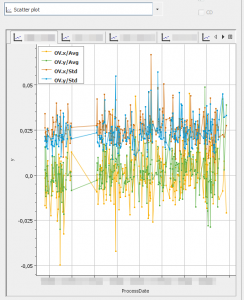
All charting is handled by a dedicated Statistics module. It supports diagram templates for multiple visualization types and can combine analysis data with R2R data. Finally, the templates can be called from the analysis or R2R modules to visualize the currently selected runs.
This template-based approach is efficient and flexible. It supports advanced diagramming features like:
various diagramming types
- scatter plot
- box plot
- pie charts
- bar plot
- probability plot
- table output
- event timeline
- histogram and normal
- distribution chart
Data can also be grouped into separate charts or series based on the run context.
Grouping
The software allows to measure several features with one single recipe. All features are assigned to separate groups. A single group or a combination of groups can be used for R2R control (APC). For other groups a simple statistics is calculated and a specification test is performed.
- Advanced
Multivariate Constraint Optimizer
The “Advanced Solver” is a unique approach to find the best corrective values for a given lot. The solver takes care for very specific configurations like: it accepts targets from different features with different specifications to calculate the correction it accept target specific specifications and optimizes according to the probability of a specification violation. The solver minimizes the maximum failure. The user can use the specification to fine tune lithoAPC for the chip design. The solver will access any parameter model configured by the user for the process tool.

Gradient Monitor
lithoAPC analyzes the effective gradient based on productive runs. This allows the engineer to update the configured gradient continuously.The need for test runs to find the optimum gradient will be reduced.
Source-code option
Every APC solution is a critical part of semiconductor production. This concerns both the availability of the APC solution and the support for new requirements. We offer a source-code option for the APC solution, which allows you to integrate your own modules, implement new functions and, if required, continue to develop the solution independently.

lithoAPC Overlay
Features
lithoAPC impresses with its modern design and user-friendly interface.
Engineers can navigate features quickly because the architecture is structured and consistent.
- General
The analysis features address all needs of a modern chip production. The features support high end production as well logic FABs like chip production for automotive, mobile devices or sensors.
lithoAPC support sophisticated exposure approaches like:
- standard exposure
- multiple exposures
- double exposure
- multiple images
- mixed products
- stiched products
- first layer analysis
- wide field exposures based on advanced mathematical algorithms lithoAPC provides the optimal results for
- systematic failures
- statistics
In addition the system provides internal information about the analysis to support the engineers with helpful information about the process setup and the analysis flow.
Intuitive user interface
All modules are integrated into the APC desktop application. The interface combines the functions required to configure, monitor, and control APC workflows. In detail, this includes:
- visualize measurement and process data
- create, delete, and configure master data
- control the status of master data
- visualize and compare all analysis results and
intermediate information including- systematic failure
- value and residual statistics
- residuals
- trigger manual analysis for single or selected runs
- edit run context information or measurement values
- access wafer visualizations
- visualize the process timeline in diagrams
- access user management and system capabilities
- connect to any lithoAPC server in the network
- export and import functionality
- copy table data
The ongoing development of the system will produce frequent new modules and new features accessible in the user interface.

Master data and parameterization
APC completely is configurable by master data. Any master data item can be an active item – like an active analysis step – or a passive item, which is required for the analysis like wafer layout, target set, parameter model.
New master data implementations are accepted and allow easy functional enhancements to the system. Every master data item can be parameterized. In this case the values are evaluated with the first request for the given run.
- Standard
All features can be enabled or disabled. The master data controls all activated features in detail. The parameterized work flow contains all activated steps of the analysis.
Workflow based
The analysis of lithoAPC is document and work-flow based. The work-flow is defined by the engineers in the master data. It contains the general flow of dedicated analysis steps and their settings. The document approach ensures, that all details of the analysis is collected into a single document, which is stored in the system database. It can be reviewed by the engineer at any time.

Fine alignment
The target locations provided by measurement tools usually do correspond to the design coordinates. If a target set of the design information is provided, lithoAPC calculates the wafer shift and corrects the target location to the real design coordinates. Furthermore, recipe issues are detected and the measurement is rejected.
Outlier elimination
The calculation of the startup values is based on previous runs and their optimal process conditions. The system expects a continuous distribution and tests the data quality. The outlier elimination will detect and remove all runs, which do not follow the common behavior.
Outlier elimination is based on a combination of absolute outlier limits and the definition of relative tunnels.
Data validation
All incoming data are validated against limit values. This allows to mark targets with unreliable values or to remove values already flagged by the measurement tool.
Standard analysis
- stepper/ scanner
- wide field stepper
- HOPC – high order parameter models
- CPE – correction per exposure
Qualification step
lithoAPC has an integrated rule based qualification function. The user defined rules are applied on the input and output values or the work flow. As result of the qualification check messages for the MES system are generated, which can be used to control the next process steps of the lot.
Charting
All charting is handled by a dedicated Statistics module. It supports diagram templates for multiple visualization types and can combine analysis data with R2R data. Finally, the templates can be called from the analysis or R2R modules to visualize the currently selected runs.
This template-based approach is efficient and flexible. It supports advanced diagramming features like:
various diagramming types
- scatter plot
- box plot
- pie charts
- bar plot
- probability plot
- table output
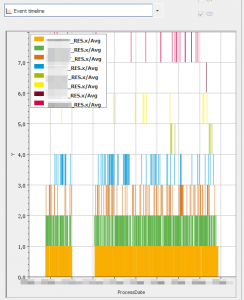
- event timeline
- histogram and normal
- distribution chart
Data can also be grouped into separate charts or series based on the run context.
- Advanced
Multivariate Constraint Optimizer
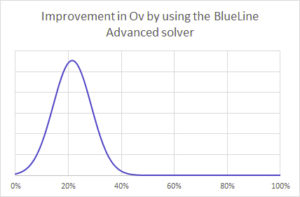
The “Advanced Solver” is a unique approach to find the best corrective values for a given lot. The solver takes care for very specific configurations like: it accepts targets from different features with different specifications to calculate the correction it accept target specific specifications and optimizes according to the probability of a specification violation. The solver minimizes the maximum failure. The user can use the specification to fine tune lithoAPC for the chip design. The solver will access any parameter model configured by the user for the process tool.
Pre - Bias
lithoAPC support preBias. This analysis step removes a given systematic from the measured misalignment. It allows to correct a known systematic of the measured targets.
Post - Bias
The postBias analysis step add a systematic failure to the result of the analysis. A tool introduced failure of the next process step can get compensated.
Source-code option
Every APC solution is a critical part of semiconductor production. This concerns both the availability of the APC solution and the support for new requirements. We offer a source-code option for the APC solution, which allows you to integrate your own modules, implement new functions and, if required, continue to develop the solution independently.

lithoAPC Master data
Features
“Master data” are all control information used to build and setup the workflow for any LithoAPC activity.
Master data might be very simple values or complex data structures.
The master data parameterization allows to adapt the master data with process specific settings depending on the current run. The system accepts any new type of master data – which allows to add workflow steps and needed data.
- Hierarchical structure
- Internal, powerful query engine to select the correct master data
- Comfortable master data editor
- State flow to control impact of master data
- Master data allow to
- Dynamically adjust the workflow (translate master data)
- Use customer specific parameterization to evaluate specific values for current run
- Minimal maintenance effort and maximal flexibility
Analysis workflow
All activities are workflow based. An analysis document is processed by several sequential steps. The workflow is under full control of the user.
- A workflow can be
- Dynamically changed (enhance workflow for current run)
- Parametrized (use run specific process setup for all calculations)
The analysis document is stored in the database. It contains all details of any analysis step. The user has full access to all details within this document.
Architecture
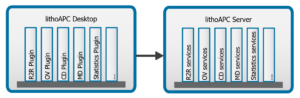
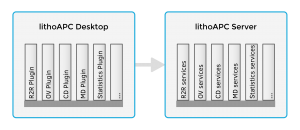
- Plug-in architecture
- Supports flexible, user specific deployment
- Allows functionality to be added or removed
- Extensible (by user and third party)
- Existing (productive) modules:
- R2R, CD, OV, MasterData, Statistics
- Modules in work:
- CMP, WaferLayout management, User management
Integration
- Flexible integration into any infrastructure
- Tool connection implemented by customer specific agents
- Connect by message bus, web service calls or other protocols
- Database connection implemented using Hibernate
(support for all common database management systems) - Scalable & configurable deployment
- Runs single or multiple servers
- Dedicated server for online requests
(process tools) - Hosted on shared or distinct physical servers
- Proven on virtual infrastructure
- Requirements
- 12 GByte memory
- 500 GByte storage
- 1 GBit network interface
- i7 Quad-core CPU
- Oracle 9 ++
(or SqlServer, MySql, Postgres, DB2)